GST invoice format: what to include, with a free template
A practical guide to the fields a GST tax invoice needs, which copies to issue, and how to create one correctly in a couple of minutes.
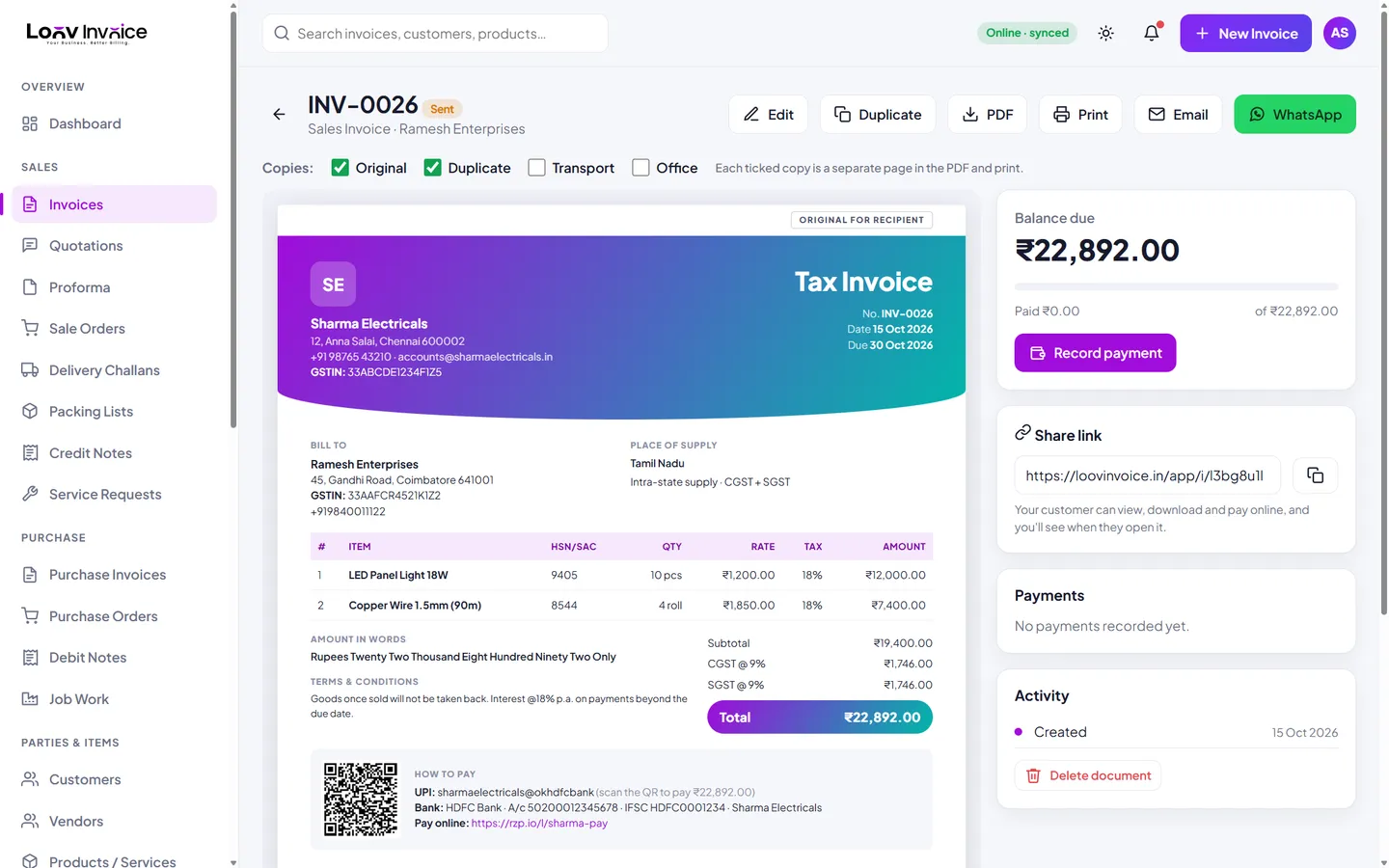
Mandatory details on a GST tax invoice
Under the GST invoice rules, a tax invoice should include:
- Your name, address and GSTIN
- A unique, consecutive invoice number for the financial year (up to 16 characters) and the invoice date
- The customer's name and address, and their GSTIN if they are registered
- The place of supply, with the state name, for inter-state supplies
- A description of the goods or services, HSN or SAC code, quantity and unit
- The total value, any discount, and the taxable value
- The tax rate and amount of CGST and SGST (or UTGST), or of IGST
- Whether tax is payable on reverse charge
- A signature or digital signature of the supplier or an authorised person
Loov Invoice fills all of these in for you from your business profile, the customer record and your product list.
CGST + SGST or IGST?
If the supplier and the place of supply are in the same state, the tax is split equally into CGST and SGST (for example 9% + 9% for an 18% item). If they are in different states, the full rate is charged as IGST. Loov Invoice compares your state with the customer's and applies the right one automatically.
How many copies of a GST invoice?
For goods, the usual practice is three copies: Original for recipient, Duplicate for transporter and Triplicate for supplier. For services, two copies are usual. In Loov Invoice you tick Original, Duplicate, Transport or Office and get every copy as a separate page, with its label printed at the top.
HSN code digits
The number of HSN digits you need depends on your annual turnover and whether the sale is B2B or B2C. Check the current notification for your turnover band. In Loov Invoice you save the HSN or SAC code once on each product.
Everything included
All mandatory fields
Filled from your profile, customer and products.
Amount in words
Added automatically in Indian or international format.
Copies with labels
Original, Duplicate, Transport and Office.
GST Format template
A bordered, grid-style layout preferred by accountants.
How to do it in Loov Invoice
- Open Loov Invoice and choose New Invoice.
- Select the customer: the place of supply is set from their GSTIN.
- Add items with HSN codes and GST rates.
- Choose the copies you need and download the PDF.
Frequently asked questions
Is a GST invoice valid without a signature?
The rules ask for a signature or digital signature. Loov Invoice prints your uploaded signature, or an "Authorised Signatory" line, on every invoice.
Can a GST invoice be in a foreign currency?
Yes, for exports. Loov Invoice supports export invoices in USD, AED, GBP, EUR and more, with the exchange rate recorded.
What is the difference between a tax invoice and a bill of supply?
A tax invoice charges GST. A bill of supply is used when no tax is charged, for example by composition dealers or for exempt supplies.
Start free. Your first invoice takes about a minute.
Free plan with 10 invoices every month. Pro is free for 15 days in India, with no card needed.